The Hidden Costs of Outdated EHR Systems

Nearly every practice in the country already operates on an electronic health record. Federal survey data published by ASTP/ONC shows that 95% of office-based physicians used an EHR by 2024, and 91% used a certified system. Adoption stopped being an interesting question some years ago.
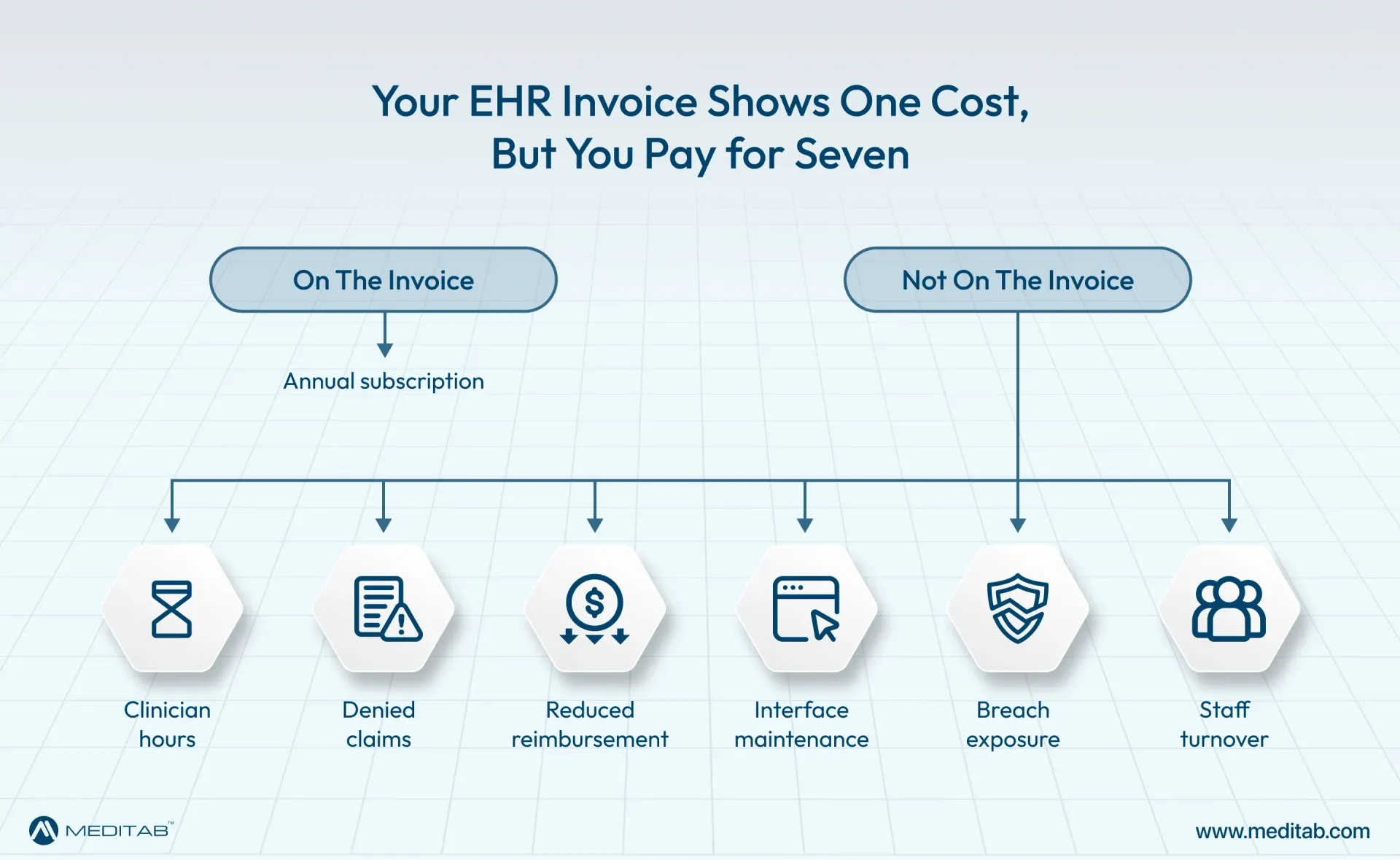
Many of those systems were purchased a decade or more ago, and a fair number have not meaningfully changed since. Since the invoice stays predictable, the software feels affordable. The genuine cost of an outdated EHR rarely appears on that invoice. It shows up in overtime, denied claims, the extra clicks a physician makes several hundred times a day, and eventually in staff who start taking calls from recruiters.
What Counts as an Outdated EHR System?
An EHR's age alone is a weak test. Some platforms sold in 2014 are still maintained carefully, while others bought three years ago were built on architecture that was already tired. Outdated EHR systems are easier to identify by how they perform than by when they were purchased.
The signals tend to be consistent. Updates arrive once a year, if that happens at all. The interface still assumes a desktop, a mouse, and a full keyboard. Patient information leaves the system as a PDF or a fax rather than as a structured record. Support means a ticket queue instead of someone who knows your practice. Systems in this condition usually lag on data standards, as well. The software limitations compound the issues because a platform that cannot exchange information forces your staff to manually rebuild what should have arrived automatically.
It also helps to be precise about what you actually use as a system. Practices sometimes discover they have been paying for a records system rather than a full clinical platform. This matters a great deal before you start shopping for a replacement EHR. Our explanation of the differences between an
EHR and an EMR covers where that line sits.
Where the Money Goes
Outdated EHR systems rarely fail outright. They degrade, and the expense of that degradation gets absorbed into ordinary operating budgets where nobody files it under technology. Pulling those costs back out is the only way to see what the software is really costing you.
1. The hours that disappear into the patient chart
Physicians rate their EHR software worse than nearly anything else they use at work. In a study of 870 physicians published in Mayo Clinic Proceedings, the average usability rating came to 45 out of 100, an F on the standard scale. This placed EHR software below Microsoft Excel and far below Google. The same research found a clear association between how poorly physicians rated their system and how likely they were to report burnout.
A single extra click costs almost nothing. Repeated forty times in an encounter, across twenty encounters a day, it becomes the reason patient notes get finished at nine in the evening. That time is a genuine expense even though no line item records it.
2. Revenue that never reaches the account
Claims built on incomplete eligibility checks are returned as denied. Codes that have to be entered a second time often get entered incorrectly. Charges captured on paper and posted later get missed altogether. None of this registers as healthcare IT costs, yet each item traces directly back to an EHR system. Seeing the full picture takes some effort, and our
complete guide to EHR costs breaks down where those monetary shortcomings sit.
3. Falling behind what regulators expect
Certification is not decorative.
CMS requires participating providers to use certified EHR technology to be considered a meaningful user and avoid a downward payment adjustment. A vendor that has stopped investing in its platform will eventually stop keeping pace with certification criteria. These omissions reach you as reduced reimbursement rather than as a software bill. It is one of the few places where you can calculate the cost of an outdated EHR to the dollar.
4. Interfaces that cost more every year
Older platforms usually connect to laboratories, imaging centers, pharmacies, and payers through custom-built interfaces. Each one must be maintained, and every change on the other end means paying someone to fix it. Over time, a practice can spend more time and money keeping these connections alive than on the software itself. Anyone weighing a move should read about
common EHR integration challenges before assuming the work will be straightforward.
5. Security exposure that grows quietly
Software that no longer receives regular patches becomes steadily easier for hackers to attack. Healthcare remains the most expensive industry to experience patient data breaches.
IBM's most recent cost-of-a-breach research puts the average healthcare breach at $6.64 million, the highest figure of any sector studied. For a small or mid-sized practice, one incident can outweigh a decade of subscription savings.
6. The clinical and non-clinical staff who leave the practice
Turnover is the cost practices notice last and pay for the longest. Front-desk teams and clinicians who spend their working day fighting software eventually find somewhere else to work. To replace them costs recruiting time, training time, and lost productivity all at once. This is the quietest entry on the list and frequently the largest.
Signs it is Time to Replace Your EHR
Reading a list of costs is one thing. Recognizing them in your own practice is another, and the signals usually arrive together.
If your team has built workarounds; spreadsheets, sticky notes, and shared documents living outside the system these are reliable signs that the software no longer matches how the practice works. When support tickets go unanswered, or the answer is that no fix is planned, or answering a simple question about collections or no-show rates requires exporting to an Excel sheet first, it’s time to seriously consider a replacement. We understand onboarding a new provider takes weeks, not days. The vendor roadmap, if you can find one at all, has not changed in two years.
No single item on that list justifies a migration. Three or four of them together usually do. If your practice has reached that point, it helps to know what commonly goes wrong during a change, and our list of mistakes practices make when
choosing an EHR is a sensible place to begin.
How Modern EHR Systems Reduce Total Cost of Ownership
The case for replacing outdated EHR systems isn't that newer software has a smaller license fee, because it often doesn't. The case is that total cost of ownership includes much more than licensing, and a modern platform moves most of the other numbers in the right direction.
Consolidation accounts for the largest share of that shift. When scheduling, charting, billing, patient communication, and reporting all live in one platform, interface maintenance costs largely disappear. In fact, so does the labor spent reconciling systems that disagree.
Hosting is another major variable, though not in the way it is usually presented. A cloud deployment removes servers, backup hardware, and after-hours patching that quietly inflates healthcare IT costs year after year. A practice with capable IT staff and infrastructure already paid for may find an on-premises server works out better. The mistake is being pushed toward one model because the vendor only sells one. Practices weighing that decision can compare cloud and on-premises deployment side by side.
It is worth being honest about what cheaper means in this context. A lower-cost Electronic Health Record (EHR) system measured purely by monthly subscription rates can easily prove more expensive once you factor in denials, downtime, and staff hours. Our guide to
EHR return on investment sets the framework for making that comparison properly.
Why Practices Are Choosing Meditab’s IMS
Meditab built IMS (Intelligent Medical Software) on the idea that a practice shouldn't have to assemble its own software stack from separate parts. Scheduling, charting, e-prescribing, billing, patient engagement, and analytics sit together in a single all-in-one EHR platform. The workflows are built for individual specialties rather than one generic template stretched across forty of them.
IMS is ONC-certified and HIPAA-compliant. It functions on whichever deployment model the practice prefers between on-premises, cloud-based, ASP, or SaaS. That flexibility matters more than it sounds, because a vendor supporting only one model will eventually decide for you, usually at renewal. AI features are also available to work with Meditab’s IMS that absorb documentation and administrative work.
For practices carrying the accumulated cost of an outdated EHR, the appeal usually has less to do with any single feature. It is usually spotted in gaps between systems and in a lack of clarity about how their software must be hosted.
In Short
Outdated EHR systems are expensive in ways that resist easy accounting. The subscription line stays flat while the real spending migrates into overtime, denials, interface maintenance, security risk, and turnover. None of these fall under healthcare IT costs even though that is precisely what they are.
Before asking what a new system would cost, work out what the current one is already costing, and then compare the two honestly. Most practices that do this find the answer isn't close. If you would like to see how that comparison looks for your own practice, you can
schedule a demo with our team.
FAQs
How do I know whether my EHR is genuinely outdated or simply unfamiliar?
Look at the vendor, not the interface. If updates are rare, certification is lagging, support is slow, and the roadmap has not moved, the platform is outdated, whatever it looks like on screen. If the software itself is current but the team is struggling, the problem is far more likely to be equipment shortcomings, configurations, or training-related issues.
What does an outdated EHR actually cost a small practice each year?
There is no single specific figure, because most of the expense is spread across payroll, denials, and IT support rather than gathered in one place. A practical approach is to total your annual interface maintenance, the denials written off because of data errors, and the overtime hours spent on documentation. That sum is generally larger than the license fee.
Is switching EHR systems worth the disruption?
That depends on what the current system costs and how carefully you plan the migration. Data migration, training, and a temporary dip in productivity are all real. They are also one-time, whereas the cost of an outdated EHR recurs every year until something changes.
Will a cheaper EHR save money?
Sometimes, though not reliably. A lower-cost Electronic Health Record (EHR) system that lacks integrated billing, or charges extra for functions most practices consider standard, often costs more once you add everything up. Compare total cost of ownership rather than a subscription price.
How long does an EHR migration usually take?
For most small and mid-sized practices, the answer falls somewhere between six weeks and four months, depending on data volume, the number of integrations involved, and how much configuration the specialty requires.
Share this post: