Why Credentialing for Allergists Matters and How IMS Helps You Achieve It

An allergist can be board certified, licensed, and fully booked with immunotherapy patients, and still not get paid for a single visit if the payer enrollment behind those visits is incomplete. Allergist credentialing is what closes that gap. It confirms that a provider is qualified to practice and gives payers the green light to reimburse the care that provider delivers. Medicare alone requires a multistep enrollment before a provider can bill, as the CMS guide to becoming a Medicare provider lays out.
Commercial payers and Medicaid plans each add their own applications and timelines on top of that. For a busy allergy practice, keeping everything current by hand creates steady delays and lost revenue, which is why more practices are turning to allergist credentialing software. This guide walks through what credentialing involves, why it matters, where practices tend to struggle, and how the right tools, working alongside IMS, keep your providers enrolled and billing.
What is Provider Credentialing for Allergists?
Provider credentialing formally verifies a clinician's qualifications. Allergist credentialing confirms medical education, residency and fellowship training in allergy and immunology, state licensure, DEA registration, malpractice coverage, work history, and board certification. Most payers check these details directly with the issuing organization, a step known as primary source verification.
Credentialing works hand in hand with payer enrollment, the step that links a verified provider to a payer's network so claims can be paid. Without it, even perfectly coded claims are denied. That is why credentialing comes before everything covered in our allergy & immunology billing guide.
Board certification carries particular weight in this specialty. The American Board of Allergy and Immunology certifies allergists and oversees the continuing certification program that keeps that credential active. Payers expect it to be current at every review, so allergist credentialing is never a one-time task. It repeats for as long as a provider practices.
Why Credentialing Matters for Allergy Practices
Once you see what credentialing covers, its impact on the practice becomes clear. Allergy practices bill a high volume of repeat services, including skin testing, weekly immunotherapy injections, and biologic administration. If a provider's enrollment lapses with a payer, every visit during the gap can be denied, and many payers will not pay retroactively. Allergist credentialing protects the front end of the revenue cycle, and it belongs at the top of any revenue cycle management strategy list.
Allergist credentialing also shapes patient access. Patients choose allergists from their insurer's directory, so a provider who is not listed in-network is effectively invisible to them. It also matters for compliance, since payers require current credentials, and Medicare asks most providers to revalidate their enrollment every five years. Finally, it controls growth. Every new allergist, nurse practitioner, or location has to be credentialed before seeing insured patients at full reimbursement.
Common Credentialing Challenges for Allergists
If credentialing is this important, why does it go wrong so often? The problem is rarely a lack of effort. It is the volume of moving parts. A single provider may be enrolled with a dozen payers, each with its own forms, portals, and follow-up schedule, and applications often take several months to process.
Many commercial payers pull provider data from CAQH ProView, and providers must review and re-attest that profile every 120 days to stay active. The CAQH platform reduces duplicate paperwork, but only if someone keeps the profile accurate and up to date. A missed attestation can quietly stall several applications at once.
Other challenges stack up alongside it. Licenses, DEA registrations, malpractice policies, and board certifications all expire on different dates. Incomplete or inconsistent applications get sent back, which restarts the clock. And when the one staff member who manages allergist credentialing leaves, much of what they knew often leaves with them.
Most of these problems share a root cause. Credentialing data lives in spreadsheets, inboxes, and filing cabinets instead of one reliable system, and that is exactly the gap allergist credentialing software is built to fill.
Notice that none of those rows is about feature count. Both categories can chart a visit and send a claim. What separates them is who does the configuring, how long the organization can tolerate disruption, and whether the software arrives ready for a specialty or waiting to be told what one is.
What is Credentialing Software?
Allergist credentialing software is a centralized system for storing provider data, managing documents, tracking payer applications, and flagging deadlines before they become problems. Rather than rebuilding the same information for every payer, staff maintain one accurate record per provider and reuse it across applications.
Credentialing software for allergist practices works best when it sits alongside the systems that run the rest of the practice. The EHR and practice management platform handle scheduling, documentation, and billing, while the credentialing tool makes sure every provider on the schedule is cleared to bill. Understanding how the right EHR enhances allergy practice efficiency helps you see where credentialing fits into that bigger picture.
Key Features to Look For in Allergist Credentialing Software
The strongest allergist credentialing software shares a handful of core features.
Centralized Provider Profiles
Every license, certificate, NPI, DEA number, and work history detail should live in one profile per provider. Credentialing software for allergist groups with several providers should also let staff view status across the whole team at a glance.
Expiration Tracking and Alerts
Automated reminders for licenses, DEA registrations, board certification, malpractice policies, and CAQH attestations are essential. Good allergist credentialing software should also track payer recredentialing and Medicare revalidation deadlines, since a missed date can pause reimbursement.
Payer Enrollment Tracking
Look for credentialing software for allergist practices with a dashboard that shows where each application stands, who submitted it, and when to follow up. This is where allergist credentialing software saves the most staff time.
Secure Document Storage
Credentialing files contain sensitive personal information. Choose
HIPAA-compliant
credentialing software for allergist teams with role-based access and a clear audit trail.
Reporting and Integration
Reports on pending applications, upcoming expirations, and payer status keep leadership informed. Credentialing software for allergist practices should also connect easily with your billing workflow, so enrollment status and claims stay in sync.
How Credentialing Software Benefits Allergy Practices
With those features in place, the benefits show up quickly. Allergist credentialing software reduces denials tied to enrollment gaps by catching deadlines before they pass. It shortens onboarding for new providers, since their data is organized and ready to submit on day one. It also cuts the hours staff spend chasing paperwork, which frees them for patient-facing work.
Credentialing software for allergist practices also improves visibility. Practice leaders can see which payers are pending, which providers are fully enrolled, and where revenue may be at risk. When an audit or payer review arrives, documentation is already organized. For growing practices, allergist credentialing software turns adding a provider from a months-long scramble into a repeatable process.
Where Meditab’s IMS Supports It
Credentialing determines who can bill. Meditab's allergy-specific EHR is where that billing happens. IMS's Electronic Medical Office keeps provider documents organized in one place, while task management helps staff stay on top of follow-ups. Intelligent claim scrubbing and denial management surface enrollment-related denials quickly, and IMS Practice Analytics lets you review claims by payer and provider. Paired with dedicated allergist credentialing software, IMS helps turn clear enrollment into clean claims and steady reimbursement.
How to Implement Credentialing Software in an Allergy Practice
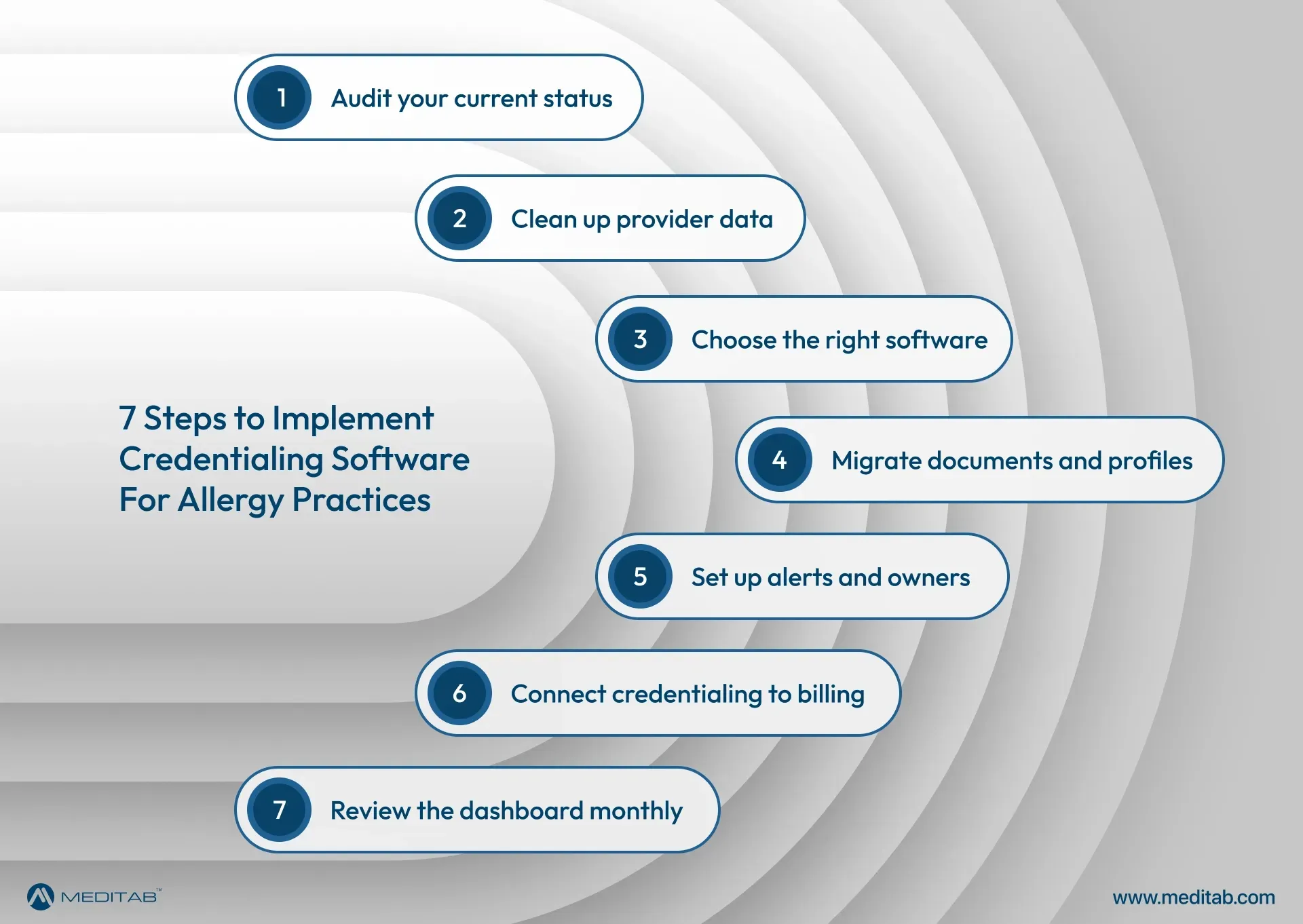
Knowing the benefits is one thing. Putting a new system into daily use is another. A structured rollout makes the move to allergist credentialing software smoother, and these steps work well for most allergy practices.
- Audit your current status:
List every provider, payer, and credential, along with its expiration date and current enrollment status. - Clean up your provider data:
Confirm that names, addresses, taxonomy codes, and NPI details match everywhere. Verify NPI records in the NPPES NPI Registry. - Choose credentialing software for allergist practices:
It should match your size, payer mix, and plans for growth. - Migrate documents and profiles into the allergist credentialing software:
Start with the providers and payers closest to a deadline. - Set up alerts and assign ownership:
Assign a named person for each deadline. - Connect credentialing to billing:
Enrollment status should inform scheduling and claims. - Review the dashboard monthly:
Refine the process as you add providers and payers.
A careful rollout helps allergist credentialing software become part of daily operations, not one more system staff have to remember to check.
To Conclude
Allergist credentialing touches nearly every part of an allergy practice, from patient access and compliance to growth and revenue. Managing it with spreadsheets and reminders leaves too much room for error, while allergist credentialing software brings the work into one organized, trackable system. Pairing that system with an EHR built for your specialty closes the loop between enrollment and payment. To see how IMS compares, explore our guide to the best AI-powered EHR for allergy & immunology.
Frequently Asked Questions
What is allergist credentialing?
Allergist credentialing is the process of verifying an allergist's education, training, licensure, board certification, and work history so the provider can join payer networks and staff.
How long does allergist credentialing take?
Timelines vary by payer, but applications commonly take several months to complete. Allergist credentialing software helps shorten delays by keeping applications complete and on schedule.
Why do allergy practices need allergist credentialing software?
Allergist credentialing software centralizes provider data, tracks expirations and re-attestations, and monitors payer applications. It reduces the enrollment gaps that lead to denied claims.
What should I look for in credentialing software for allergist practices?
Look for centralized provider profiles, automated expiration alerts, payer enrollment tracking, HIPAA-compliant document storage, reporting, and easy integration with your billing workflow. The best credentialing software for allergist groups scales with the practice.
Can allergist credentialing software work with IMS?
Yes. Allergist credentialing software manages enrollment, while IMS handles documentation, billing, and denial management. Used together, allergist credentialing software and IMS help practices keep providers enrolled and claims paid.
How often do allergists need to be recredentialed?
Most commercial payers recredential providers every two to three years, Medicare generally requires revalidation every five years, and CAQH profiles need re-attestation every 120 days. Credentialing software for allergist practices tracks all of these dates in one place.
Share this post: