Top 5 Features Your FQHC EHR Software Needs

Expanding healthcare accessibility is an uphill battle, facing resistance across economic, political, and social fronts. Despite all the barriers, however, federally qualified health centers (FQHCs) have been at the forefront of the campaign to bring quality healthcare services closer to those who need it most.
Given their crucial role in our communities, FQHCs need all the advantages they can get to help as many people as possible. And what better way to boost your practice’s strategic advantage than having tailored
FQHC EHR software?
What is an FQHC & Why Are They Important?
A federally qualified health center, or FQHC, can be any community-based healthcare facility that receives subsidies from the Health Resources and Services Administration (HRSA). They primarily cater to underserved, underprivileged, and minority populations, providing vital yet affordable medical services ranging from preventive care to complex specialty procedures.
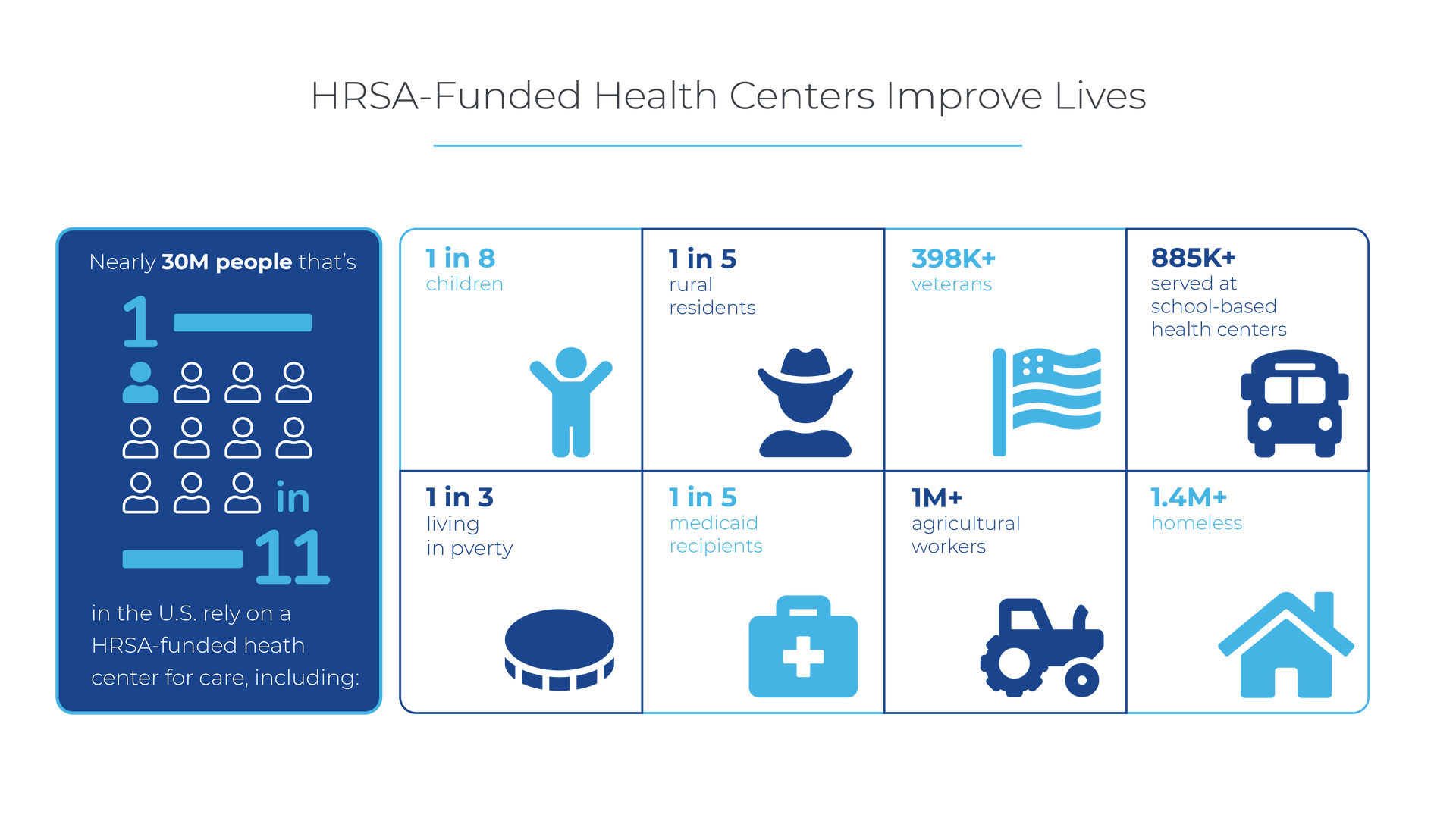
One in every eleven people in the country relies on FQHCs for their healthcare needs. Whether in rural or urban areas, the impact FQHCs have on healthcare access is vast and profound.
Source:
intivahealth.com
As the backbone of the healthcare system for the economically disadvantaged sectors of society, FQHCs expand healthcare access and strengthen public health. It only makes sense to equip your health center with the right tools that empower you to streamline workflows and maximize productivity so you can help more people without compromising your and your team’s well-being.
5 FQHC EHR Feature Must-Haves
On top of serving those at the fringes of society, FQHCs also usually offer a wide range of healthcare services that span multiple specialties, from primary care services to dental, mental health care, and other specialized areas of medicine. This makes their needs and requirements unique from other healthcare organizations.
To meet your practice’s incredibly specific needs, your EHR software has to be just as inclusive and integrated as your workflows. Here are five non-negotiable features your FQHC EHR software must have to optimize your day-to-day for maximum productivity and efficiency:
Sliding Fee Scale Automation
Designed to make medical care more accessible to low-income earners, HRSA’s Sliding Fee Discount Program protects patients from being denied service due to their inability to pay. Health centers are required to have a standardized schedule of fees or payments for the services they offer along with a corresponding schedule of discounts. These discount rates can be adjusted based on a patient’s economic capacity.
Since FQHCs primarily serve low-income patients, it’s not surprising that adjusting rates and discounts will take up a considerable chunk of your billing workflow. When revenue and profitability are at stake, you should always take steps to minimize errors; and there’s no better way to do that than by automating the process.
Integrated UDS Reports
One of the major compliance requirements FQHCs must adhere to is reporting for the Uniform Data System (UDS). Every calendar year, qualified health centers across the country submit their data on certain measures, including patient characteristics, clinical processes and health outcomes, staffing, cost, and other essential information.
Gathering data for compliance requirements is no easy task. When you’re already drowning in administrative burdens, the extra work of UDS reporting can be detrimental to your staff’s well-being and to your reporting accuracy and revenue potential. An integrated UDS reporting mechanism in your EHR can free you and your team from extra administrative work.
Grant Tracker
Defined as direct help given by the HRSA to a qualified non-federal entity (NFE), a grant can come in the form of money, property, or any kind of direct assistance. The HRSA awarded over $18.1 billion in grants to FQHCs in 2021. So if you’re not tracking and managing your grants properly, it can cost your practice federal funding.
An integrated grants dashboard in your EHR can help streamline and expedite grant processing. Since funding remains one of the most pressing issues most FQHCs face today, you want to maximize your revenue and seize every opportunity to earn; an integrated grant tracker can help you in that department.
Multi-Specialty Support
Most FQHCs offer a wide array of services ranging from dental, mental health, and other specialty services, making their practice structure and needs complex. Each specialty employs unique workflows and processes that only a tailored EHR software can meet.
A sophisticated FQHC EHR should have integrated specialty-specific templates to consolidate all specialty workflows under one comprehensive platform.
Automated Wrap Billing Workflow
The WRAP Supplemental Payment Program is a Centers for Medicare and Medicaid Services (CMS) sanctioned payment system that involves a Managed Care Organization (MCO) as the primary payer and Medicaid as the secondary.
Wrap billing is a standard workflow for most, if not all, FQHCs. So it only makes sense for an FQHC EHR to have wrap billing automation features baked into the system.
Meditab’s Proven FQHC Track Record

Advanced, all-in-one platforms like Meditab’s Intelligent Medical Software (IMS), offer complete customization options so you can tailor the system to your practice’s specific requirements. With 25 years of experience, IMS has helped thousands of FQHCs across the country streamline their workflows and maximize revenue.
Share this post: